
No products in the cart.

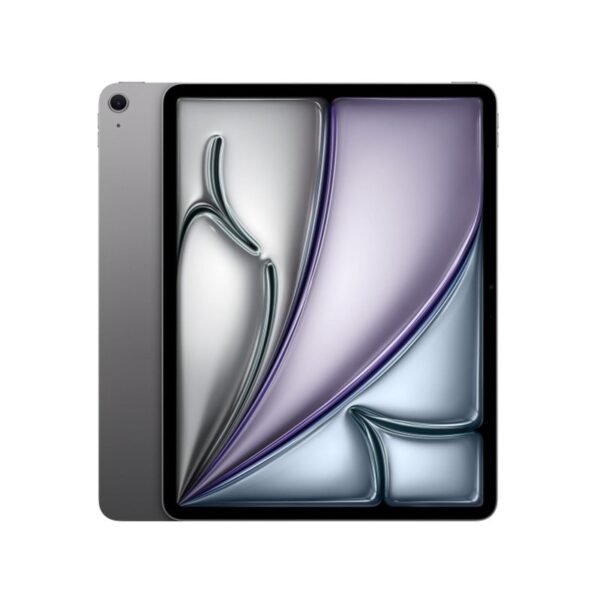

Apple air m2 13 inches (2024)
Apple iPad Air 13 (2024)
- RAM: 8 GB
- Internal Storage: 128GB, 256GB, 512GB, 1TB
- Weight: 462g
- Battery: 11,200mAh
- Main camera: 12MP
- Front camera: 12 MP
- Display: 13.0 inches
- Processor: Apple M2
- Connectivity: Wi-Fi + 5G Cellular
- Colors: Space Gray, Starlight, Purple, Blue
- OS: iPadOS 17.5
Price range: KSh110,000.00 through KSh129,000.00

Apple air m2 13 inches (2024)
Price range: KSh110,000.00 through KSh129,000.00
Description
iPad Air m2 chip 13 inches – DISCOVER AIR.
Get more done with the new iPad Air. The M2 chip delivers incredible speed for work and play, while the large display is perfect for creative projects. Discover the power of Air.
DISPLAY
The 13-inch iPad Air with the M2 chip boasts a standout display that really enhances both work and play. It features Apple’s impressive “Liquid Retina” technology, which is a top-notch IPS LCD panel. With a resolution of 2732 x 2048 pixels, it delivers a pixel density of 264 pixels per inch (ppi), resulting in crisp text and vibrant images. Plus, it’s a fully laminated screen with an anti-reflective coating that helps cut down on glare, especially in bright settings. This screen also supports essential Apple display technologies, like True Tone, which automatically tweaks the white balance to match the surrounding light, and the P3 wide color gamut, ensuring a rich and accurate color range. Compared to the 11-inch model, this 13-inch version shines brighter, reaching a typical brightness of 600 nits, making it perfect for everything from photo editing to binge-watching your favorite shows. While the iPad Air’s display is impressive for a mid-range tablet, it doesn’t quite match the advanced features of the high-end iPad Pro. For instance, it doesn’t include ProMotion technology, which offers a high refresh rate of up to 120Hz for smoother scrolling and more responsive drawing with the Apple Pencil. Additionally, it uses an LCD panel, which can’t achieve the deep blacks and high contrast ratios of the OLED (or “Ultra Retina XDR”) display found in the latest iPad Pro models. However, for most users and everyday tasks, the Liquid Retina display on the iPad Air is more than adequate and provides a fantastic viewing experience.
PROCESSOR
CAMERA
The iPad Air with the M2 chip boasts a solid camera system that really focuses on practicality and user-friendliness. The rear camera is a 12MP Wide camera with an ƒ/1.8 aperture, making it perfect for snapping clear photos and scanning documents. It can shoot video in 4K at up to 60 frames per second and comes with features like Smart HDR 4 and continuous autofocus. While it may not have the advanced capabilities of the iPad Pro’s camera system—like a LiDAR scanner or an Ultra Wide lens—it’s definitely more than enough for most tablet photography needs. One of the biggest and most appreciated changes is the new location of the front-facing camera. Apple has shifted the 12MP Ultra Wide camera from the top (portrait) edge to the side (landscape) edge. This new setup feels much more natural for video calls, as it centers your face when the iPad is held horizontally, which is how many people use their tablets with accessories like a keyboard. Plus, this camera supports Center Stage, a feature that keeps you in the frame as you move around during video calls. With this clever camera placement and the Center Stage feature, the iPad Air becomes a fantastic choice for video communication, whether for personal chats or professional meetings.
CONNECTIVITY
The iPad Air with the M2 chip is packed with a fantastic array of connectivity options, making sure you stay connected whether you’re working or having fun. All models come with Wi-Fi 6E (802.11ax), which means you can enjoy much faster speeds and lower latency compared to Wi-Fi 6, especially if you’re using a compatible router. This is super important for things like downloading large files, streaming high-res videos, and collaborating in the cloud. Plus, the iPad Air includes Bluetooth 5.3, allowing you to easily connect to a variety of accessories, such as the new Apple Pencil Pro, Magic Keyboard, headphones, and more. If you’re someone who needs to stay connected while on the move, there’s an optional Wi-Fi + Cellular model that supports 5G (sub-6 GHz) and Gigabit LTE. These cellular models use an eSIM, which makes it easy and secure to set up a data plan without needing a physical SIM card. When it comes to physical connections, the iPad Air features a versatile USB-C port. This port supports USB 3 (up to 10Gb/s), enabling speedy data transfers with external storage devices, cameras, and other accessories. It also supports DisplayPort, so you can connect the iPad to an external monitor with stunning 6K resolution at 60Hz. While this port is quite capable, it’s worth mentioning that it doesn’t have the faster Thunderbolt/USB 4 support found on the iPad Pro, which might be something to consider for users who need the fastest data transfer speeds for their professional tasks.
SECURITY
The iPad Air featuring the M2 chip comes packed with a variety of security features aimed at safeguarding your data and privacy, both through hardware and software. The main way to keep your device and personal information secure is through Touch ID. Touch ID On the iPad Air (M2), you’ll find a Touch ID sensor cleverly built into the top button, which is also known as the sleep/wake button. This is the same spot as on the earlier versions of the iPad Air and iPad mini. To unlock your device or confirm purchases and payments, all you need to do is rest your finger on that top button. Touch ID offers a secure and hassle-free way to:
Unlock the iPad
With your fingerprint registered, you can swiftly and securely unlock your device without having to type in a passcode. Authorize purchases: Your fingerprint can be used to verify purchases in the App Store, iTunes Store, and Apple Books. Use Apple Pay: When you’re making online or in-app purchases with Apple Pay, Touch ID allows for quick and secure authentication. Secure apps: A lot of third-party apps, like banking apps and password managers, support Touch ID for safe logins. Software and Privacy Features In addition to the hardware security provided by Touch ID, the iPad Air’s security is seamlessly woven into iPadOS. This includes: App Privacy Controls: The operating system gives you detailed control over what information apps can access. When an app wants to use your location, camera, microphone, or contacts for the first time, it has to ask for your permission. You can review and adjust these permissions anytime in the Settings app.
App Tracking Transparency
This feature mandates that apps request your permission before they can track you across other companies’ apps and websites for advertising. You have the power to deny this tracking or manage it for specific apps. On-device processing: Thanks to the M2 chip’s robust Neural Engine and secure enclave, many tasks—including Touch ID authentication and on-device machine learning—are processed right on your device. This means your personal data stays secure and private.
BATTERY
The iPad Air with the M2 chip 13 inches boasts of a 36.59-watt-hour battery. This extra capacity is designed to balance out the higher power demands of the larger display, ensuring that both models can deliver the same battery life under normal usage. Charging is done through a USB-C port, and it comes with a 20W USB-C power adapter right in the box. Although this charger does the job, the iPad Air with M2 is capable of faster charging if you use a higher-wattage adapter. Some tests have shown it can handle up to 30W to 35W, which can really speed up the time it takes to get a full charge.
Additional information
| Storage | 128GB, 256GB |
|---|---|
| Connectivity | CELLULAR (5G), WIFI ONLY |






Reviews
There are no reviews yet.